IoT Device Firmware Monitoring
Firmware can pass a release review and still face new vulnerabilities months later. IoT device firmware monitoring reassesses released software as vulnerability information changes. ONEKEY re-analyzes monitored firmware daily and compares each run with the previous one. The firmware security platform connects repeat analysis with product evidence. PSIRT, development and compliance teams investigate affected versions and plan a response. Deployment records then show which customers run the affected release.

Continuous Firmware Monitoring
A release scan is only a starting point. IoT device firmware stays under review after release, including older versions still in use. Teams investigate new findings without waiting for the next development cycle.
Alerts per Affected Version
Each finding stays tied to the firmware version under review. ONEKEY matches known vulnerabilities against detected components. Automated Impact Assessment adds evidence on whether a match applies to the analyzed build.

Analysis Without Source Code
ONEKEY performs IoT firmware analysis on uploaded images without source code. Teams examine supplier software and released binaries with incomplete build records. The firmware analysis platform delivers component evidence for assessment.

Firmware Analysis Automation
ONEKEY connects to CI/CD pipelines such as Jenkins, GitLab and GitHub. Each firmware build is analyzed and compared before deployment. Reports can become build artifacts. Failure policies for new findings define which results need review before release.


Four Steps to Continuous Coverage
Set Up IoT Firmware Monitoring
.avif)
Upload IoT device firmware in the platform or via a pipeline integration. Label product and version clearly. Enable monitoring after the first analysis.
Include supported versions, supplier variants and releases still in the field. The SBOM component inventory shows what each image contains.
ONEKEY emails the firmware uploader when a daily run detects changes. Assign an owner for that inbox. Define cover for absences and which findings need PSIRT review.
ONEKEY APIs pass analysis results into ticketing workflows. Each ticket carries the affected version, vulnerability ID, evidence and owning team. Remediation status stays aligned with the assessment.
IoT Firmware Analysis in Minutes
Start with a representative firmware image. Automated IoT firmware analysis delivers component and security evidence without a separate source code review.

FAQs
Firmware monitoring for IoT checks uploaded images as security data changes. These answers cover the process, new findings and CRA compliance.

How does ONEKEY identify vulnerable IoT firmware?
ONEKEY unpacks the firmware image, detects each component with its version, and matches them against NVD and OSV. Automated Impact Assessment then checks whether the vulnerability is reachable in that build at all – whether the affected kernel module was even compiled in. Code analysis separately finds hardcoded credentials, weak crypto and injection patterns.
How does ONEKEY monitor firmware for vulnerabilities?
With monitoring enabled, ONEKEY re-analyzes the firmware once a day – 23:00 UTC by default, using the same Analysis Profile so runs stay comparable. It then compares against the previous run and counts new and dropped issues, CVEs and components. Only genuine changes trigger an email to the uploader.
How does ONEKEY track the firmware update history of an IoT device?
Every analysis run is stored as its own entry in Analysis History. Monitoring runs never overwrite each other. Any two analyses compare directly, showing added and dropped CVEs, issues and components by name, version and update. Unchanged monitoring runs are cleaned up after seven days – manually triggered analyses never are.
How does ONEKEY detect firmware vulnerabilities?
Two paths in parallel: component matching against NVD and OSV for known CVEs, and static code analysis for weaknesses with no CVE entry – from command injection and stack buffer overflows to hardcoded private keys. ONEKEY also checks binary hardening, such as missing stack canaries, NX stack or RELRO in ELF files. Every finding carries a CWE mapping.
What firmware tracking capabilities does ONEKEY offer?
Per product, ONEKEY keeps every firmware version with a full SBOM plus component, CVE and issue status. Analysis comparison shows how risk evolves across versions, the audit trail records every assessment change, and global component search locates a component across all firmware. CI/CD integration folds each build in automatically.
One Solution, Many Benefits

CVE Prioritization Based on Your Actual Firmware Build
Not every CVE match means real exposure. Automated Impact Assessment checks whether a matched vulnerability applies to the analyzed build. Teams review actual product exposure instead of treating every match as confirmed exploitation.
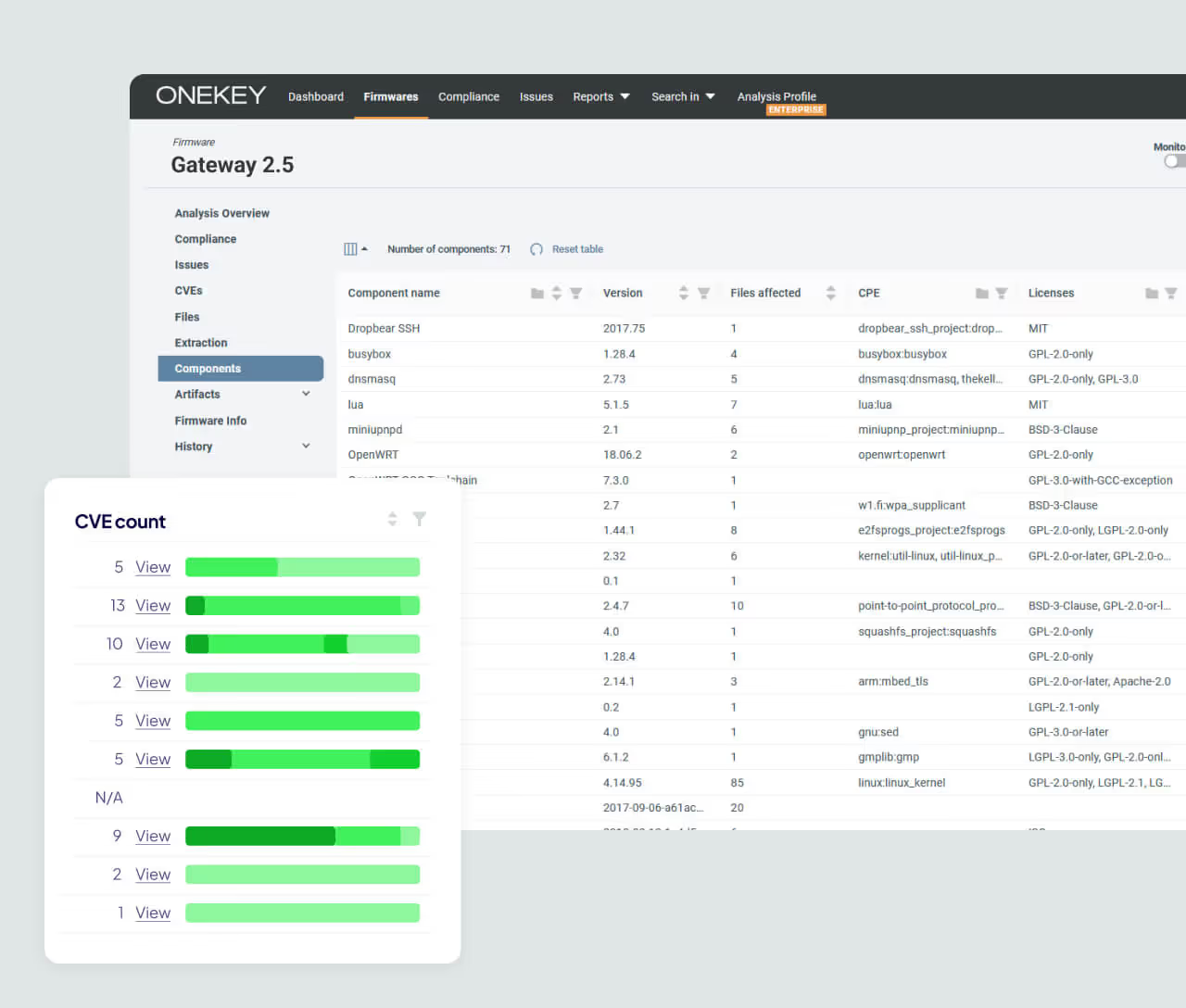
Component Inventory for Every Image
ONEKEY generates SBOM data directly from firmware binaries. The component inventory shows what each monitored image contains. This defines the monitoring scope and supports release reviews, customer requests and compliance evidence.
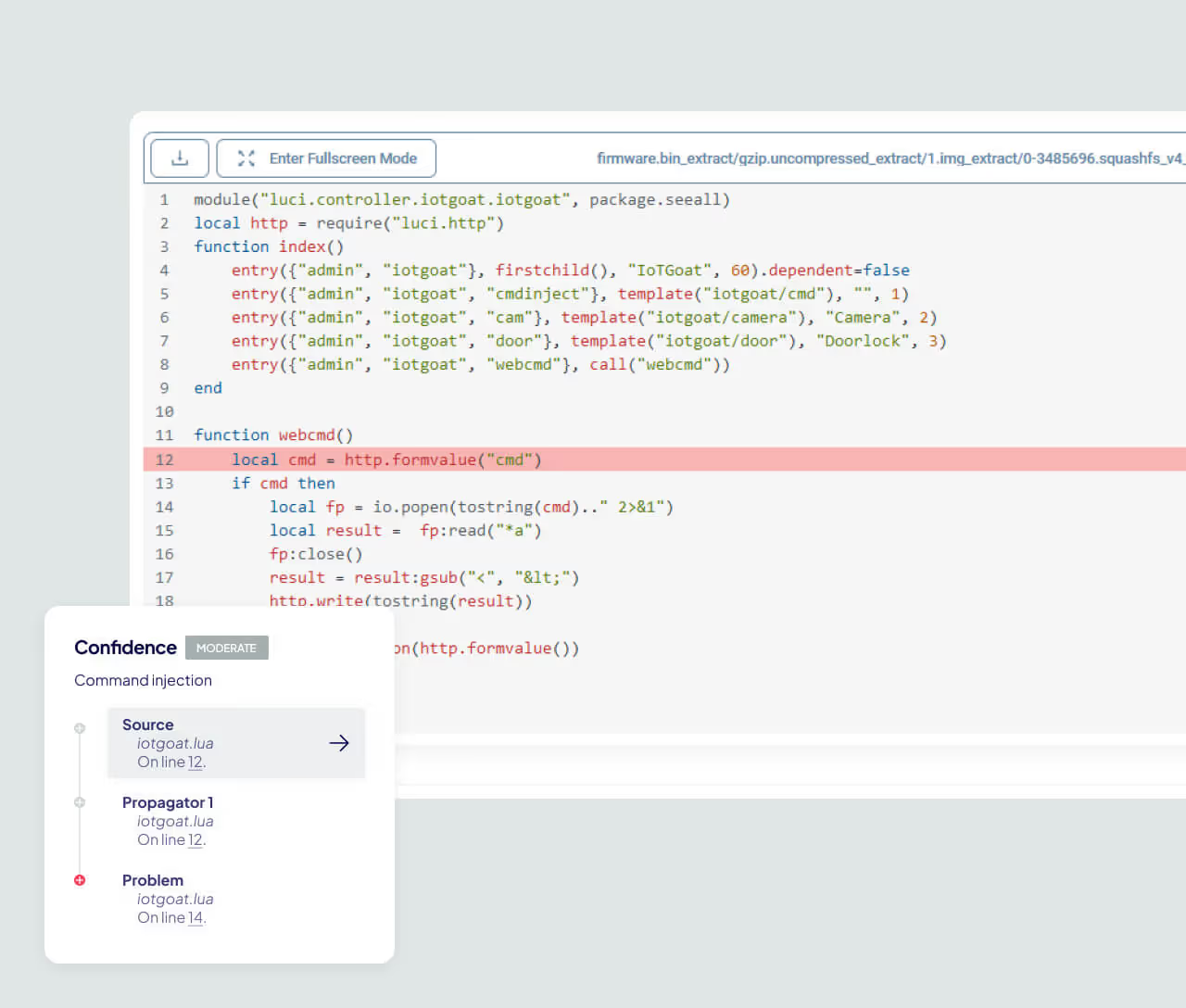
Go Beyond Known CVE Matching
ONEKEY zero-day detection finds weaknesses that have no CVE entry yet. These findings join component vulnerabilities in one review process.


