Cybersecurity Compliance Software for Connected Products
Each regulation brings its own technical requirements, evidence needs, and documentation. ONEKEY combines firmware analysis with cybersecurity compliance software for the EU Cyber Resilience Act, IEC 62443-4-2, and EN 18031. Teams find compliance gaps, review automated suggestions, and build audit-ready evidence.

Simplify Your Compliance Management
The Compliance Wizard brings firmware analysis, requirements, and evidence into one workflow for compliance and PSIRT teams.
Everything at a Glance in a Central Interface
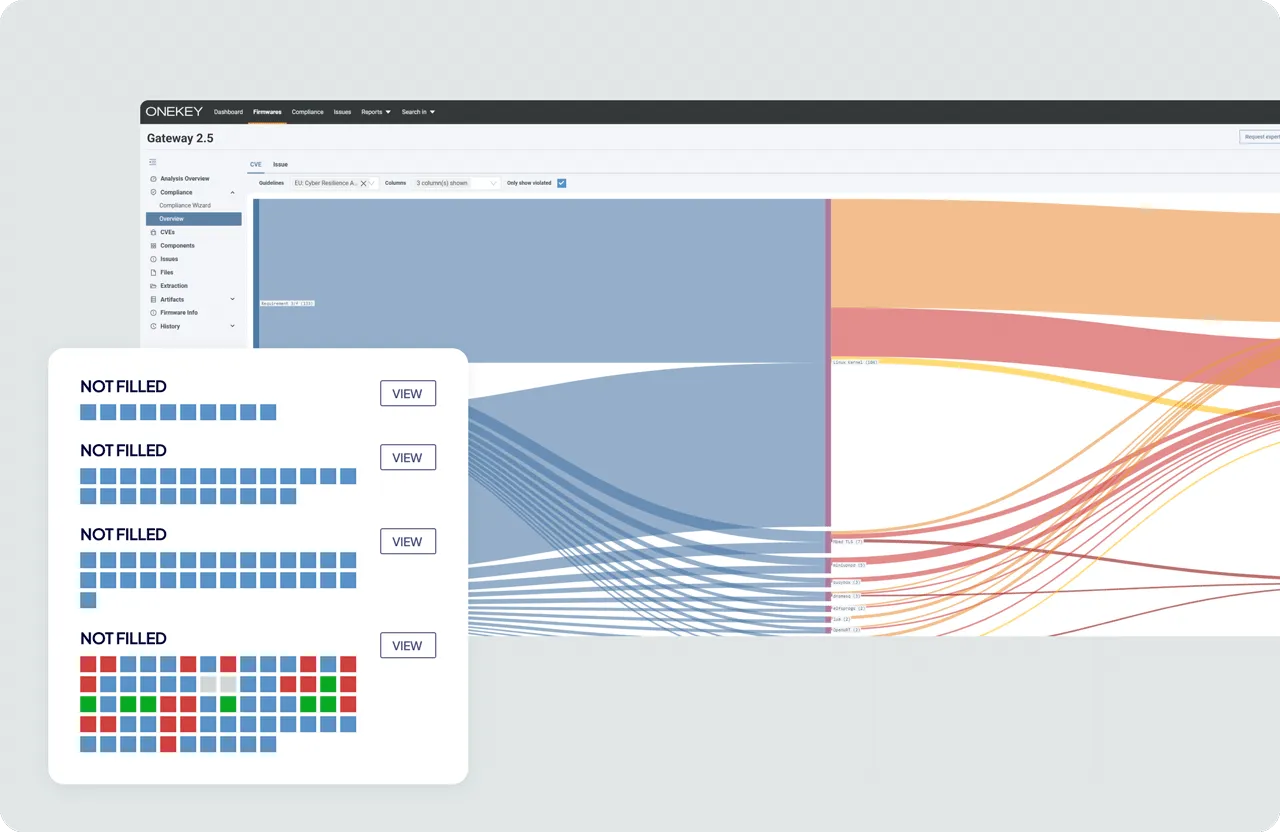
The Compliance Wizard guides teams through each provision of the guideline selected for the firmware. A color-based status view shows violated, not violated, manual-check, and not-applicable requirements. The Compliance Overview visualizes gaps across several guidelines. A global view lists guideline violations across all uploaded firmware. Linked issues and CVEs appear per provision.
Automated, Customizable Documentation
Automation pre-assesses technical requirements with firmware data. Teams accept or override each suggestion and add their own claim with arguments. Requirements that need organizational evidence stay visible for manual review. New analyses flag outdated provisions when the firmware changes. Teams review only what changed. This supports firmware SBOMs in DevSecOps.

Generate Detailed Reports with One Click
ONEKEY generates a compliance bundle with platform information and uploaded supporting materials. Compliance items also export as structured CSV or JSON. The platform keeps a history of all bundles generated for each firmware. This gives a repeatable path from technical analysis to self-assessment, customer evidence, or certification preparation. Final compliance claims stay under the team's control.


Comply with ease
How ONEKEY's Compliance Wizard Works
With our advanced ONEKEY Compliance Wizard as part of our platform, you can continuously develop, comply, resist, and repeat.
Upload the firmware and select the cybersecurity guideline that applies, such as the EU Cyber Resilience Act, IEC 62443-4-2, or EN 18031-1. ONEKEY analyzes the firmware for components, vulnerabilities, security issues, and other technical evidence. This evidence supports the compliance assessment.
The Compliance Wizard walks through each requirement of the selected guideline. It gives automated suggestions where firmware evidence supports a decision. Teams accept or override each suggestion. They document manual requirements with their own claim.
Create a compliance bundle with platform data and supporting materials. Or export compliance items in structured formats for review. ONEKEY keeps a history of every bundle generated for each firmware.
Repeat the assessment for each new build. When a new analysis changes the technical basis of an earlier decision, ONEKEY marks affected provisions as outdated. Teams see what needs another review.
Experience the ONEKEY Compliance Wizard in Action
ONEKEY combines firmware analysis, compliance checks, and evidence in a repeatable process.

FAQs
The Compliance Wizard combines automation with manual review. These answers explain how ONEKEY supports connected-product compliance.

What makes this cybersecurity compliance software different from GRC tools?
ONEKEY connects compliance requirements with evidence from connected-product firmware. Generic GRC platforms focus on enterprise controls and organizational risk. They do not analyze firmware binaries. The Wizard pairs automated suggestions with manual input where firmware alone cannot answer.
How can my product always meet current security standards?
Review compliance whenever the firmware or its security findings change. ONEKEY flags provisions for another review when a new analysis changes their technical basis. Affected provisions move to Outdated. The Compliance Wizard covers 15 guidelines, including the EU Cyber Resilience Act and IEC 62443-4-2. The compliance team still confirms which current requirements apply.
How does ONEKEY’s Compliance Wizard help manage product compliance?
ONEKEY provides a global compliance view of guideline violations across all uploaded firmware. Teams also review compliance status, supporting evidence, and generated bundles per product. Provisions show as violated, not violated, manual check, or not applicable. This structure scales across a growing product portfolio.
What are the benefits of automating product security?
Automation reduces repetitive analysis, evidence collection, and compliance review work. It applies one consistent process across products and firmware versions. New analyses flag outdated provisions automatically. Specialists spend more time on requirements that need expert judgment.
How can I ensure my product remains secure throughout its lifecycle?
Analyze each firmware release and keep monitoring supported products after deployment. ONEKEY connects product security findings with compliance and vulnerability workflows as products change. This shows new gaps that may affect the security or compliance position.
How can I integrate my cybersecurity strategy into existing development processes?
Make firmware analysis and compliance checks part of the regular development and release workflow. ONEKEY integrates with tools such as Jenkins, Jira, and Splunk. Teams close evidence and security gaps before the final compliance review.
One Solution, Many Benefits

Automated SBOM Generation from the Binary
ONEKEY identifies software components in firmware and builds or enriches an SBOM. Compliance teams get a stronger basis to understand third-party software and track it across versions. The inventory also supports vulnerability and regulatory workflows.

CVE Prioritization Based on Your Actual Firmware
A component-level CVE match does not always mean a vulnerability affects the product. ONEKEY evaluates firmware evidence to find relevant vulnerabilities. It filters findings that seem not affected. Teams focus remediation and compliance on real product risk.

Binary-Level Vulnerability Detection
ONEKEY analyzes firmware binaries without source code. It finds components, known vulnerabilities, and security issues.


